

Workshop feedback forms are structured evaluation tools that help practitioners, facilitators, and coaches gather actionable participant insights after training sessions. Effective feedback forms combine rating scales with open-ended questions to measure satisfaction, learning outcomes, and areas for improvement – enabling you to refine your programs and demonstrate measurable client impact.
Key Takeaways
- Effective workshop feedback forms use a mix of Likert scales, open-ended prompts, and targeted questions to capture both quantitative and qualitative data.
- Distributing forms immediately after a session yields the highest response rates and most accurate recall from participants.
- Digital platforms like Quenza allow practitioners to automate feedback collection, track trends over time, and integrate results into ongoing program design.
- Well-crafted feedback questions should be neutral, specific, and aligned with your workshop learning objectives to avoid bias.
- Analyzing feedback systematically helps practitioners demonstrate evidence-based outcomes and continuously improve session quality.
Writing Workshop Feedback Forms: 3 Templates
When it comes to your audience, opinions matter. But while they may have many thoughts about their experience in your workshop, it often takes a little nudge before you can really use those insights!
Collecting participant feedback is a brilliant way to spot patterns, potential improvements, and identify inadequacies in your program or delivery.
A great feedback form makes that quick and simple, but how do you create one?
Feedback Forms For Your Training Workshop
As with any form, a really great feedback form is one that will yield useful insights about the different elements of your workshop.
If you’re delivering training as a leader, instructor, coach, or therapist, there are a few aspects worth exploring.
Consider the following elements, as a start:
- Instruction or teaching: How satisfied are your participants with your teaching style? How could it be improved?
- Facilitation (in group settings such as team coaching): How effectively did you facilitate the workshop? Did participants feel included?
- Materials or content: Were your resources/materials helpful? Were they too easy, too hard, or just right?
- Program design: Did the materials flow in a logical order? Were there a good number of steps? Was each step delivered at an appropriate interval?
- Class/cohort: Was the cohort a good size for participants? Did they have a chance to help each other?
- Relationship/communication: Did you answer questions effectively?
- Overall experience: How satisfied were they overall? Would they recommend your workshop to their colleagues or peers?
These different aspects can all be explored by dividing your form into sections. But first, you’ll need to tailor your questions to your particular audience and goals.
If you prefer to work with a ready-made layout, there are great templates in Quenza’s Expansion Library that you can modify, to name a few:
- End of Therapy Evaluation
- Coach Evaluation Form
- Effectiveness of Session Evaluation
7 Sample Questions You Can Include
Just as there are no ‘right answers’ on a feedback form, there aren’t any magic questions you should be asking.
The best way to develop items for your form is by working backward.
Think about the most constructive information you could have at hand when you sit down to improve your workshop, and design neutral questions that help you capture those insights.
If you’re looking for some guidance, you might start by tweaking these workshop feedback form sample questions:
- What is your overall assessment of the event? (on a Likert scale of 1-5, insufficient to excellent)
- Did the workshop achieve the program objectives? (Yes/No)
- Which topics or aspects of the workshop did you find most interesting or useful? (You can experiment with multiple-choice/drop-down menu formats using Quenza’s Activity Builder)
- How do you think the workshop could have been made more effective?
A few more examples can be found in Quenza’s Effectiveness of Session Evaluation Expansion, pictured below.
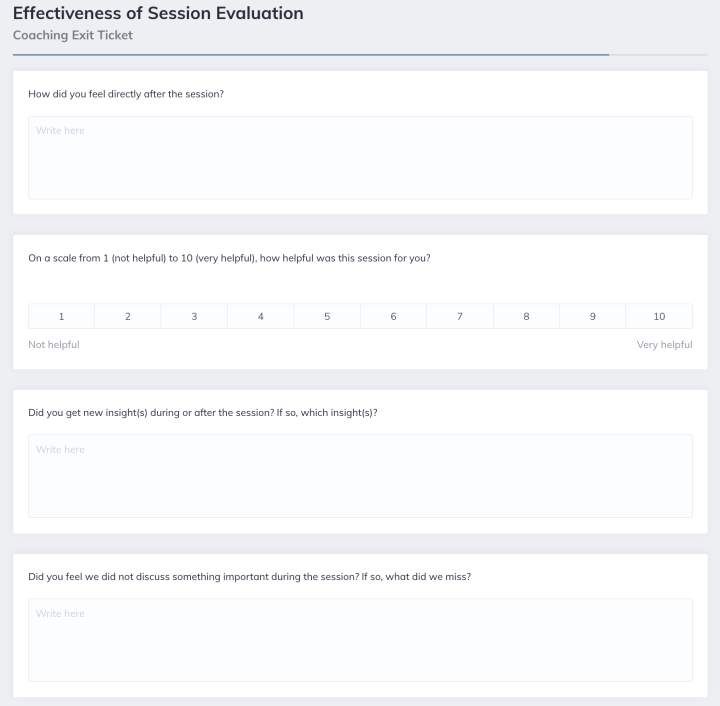
While designed for post-session evaluations in one-on-one, this customizable template includes items that can easily be modified to assess your workshop or learning module:
- I felt heard, understood, and respected. (Agree = 1, Strongly Disagree = 5)
- We worked on and talked about what I wanted to work on and talk about.
- The coach’s approach is a good fit for me.
Workshop Feedback Question Types at a Glance
| Question Type | Example | Best For |
|---|---|---|
| Likert Scale (1-5) | Rate overall session quality | Quantitative benchmarking |
| Open-Ended | What was your biggest takeaway? | Qualitative depth and insight |
| Multiple Choice | Which topic was most valuable? | Quick analysis and comparison |
| Yes/No | Would you recommend this workshop? | Net Promoter-style metrics |
| Rating Matrix | Rate each module on relevance | Multi-dimension evaluation |
Best Way To Make and Send Feedback Forms
Once you’ve decided on the questions you’d like to ask, the next step is to create a survey or questionnaire that participants will want to fill out.
Using Quenza’s Activity Builder, you can put together a form by titling and saving a blank template.
Then, you can create sections for your various fields using Page Breaks and drag various fields from the right-hand menu into your template.
Among other fields, tour Activity Builder contains everything you need to create:
- Text boxes for questions
- Short- or long-answer items
- Drop-down menus
- Multiple-choice questions
- Checkboxes, and
- Linear scales.
As we’ll see in a second, it’s not a bad idea to personalize your form by uploading your custom logo and multimedia!
Sending Your Forms To Participants
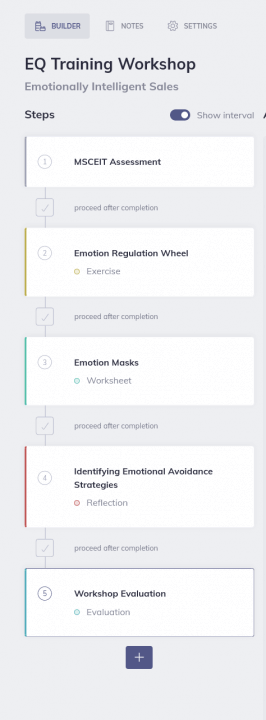
If you’re running a group workshop using Quenza Groups, you can send your forms as an Activity to all your participants at once.
This is a fast, convenient way to collect opinions from everyone, and also helps you explore the effect of any changes you make from one workshop to the next.
You can do this either by sending your form as a standalone activity, or inserting it into a Pathway as a final step, as shown below.
Digital vs. Paper Feedback Collection
| Factor | Digital Forms | Paper Forms |
|---|---|---|
| Response Rate | Higher with automated reminders | High if distributed in session |
| Data Analysis | Automatic aggregation and trends | Manual entry required |
| Anonymity | Easy to configure | Naturally anonymous |
| Cost | Platform subscription | Printing and distribution |
| Follow-Up | Automated scheduling possible | Requires manual effort |
Asking For Evaluation with Quenza: An Example
Not sure how to ask for feedback? Here are a few helpful tips:
- It’s always worth giving your clients a little background into why you’re asking for their thoughts. Quenza Activities always come with a pre-made email template for your participants–this is a great place to share that you’re trying to improve your solutions.
- Your participants don’t have to fill out your form. This means you’ll want to create a form that’s as concise as possible, while capturing everything you need to enhance your workshop.
- Deliver your form as soon as possible. This way, you can collect their insights while they’re top-of-mind, giving you plenty of time to plan or implement your improvements.
- Make your form engaging. Short and sweet is good, but you can also improve completion rates by personalizing your form with images, video, and other multimedia. Get creative, and you may get more feedback!
Analyzing Your Feedback Report
So you’ve shared your form. Now what?
By clicking into the Activities tab of your Quenza Groups as shown below, you can get an instant overview of your cohort’s collective progress on your feedback form, as well as other Activities you’ve shared.
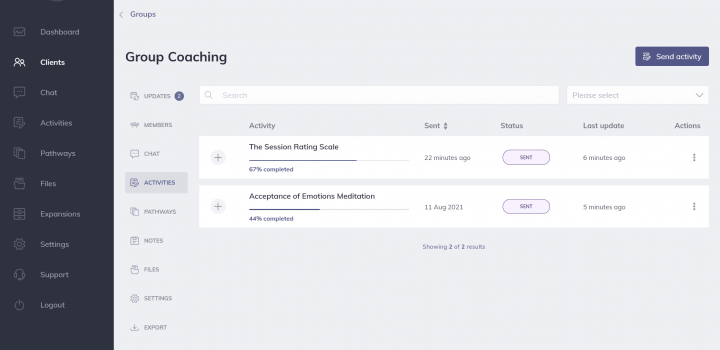
You can also check how each participant is progressing by generating a feedback report.
When you click the ‘+’ sign beside your feedback form, you’ll be able to see submission statistics as shown here.
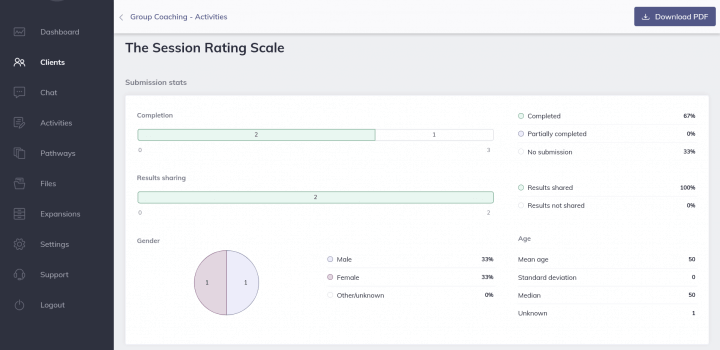
This analysis reveals:
- The completion status of your feedback form (% of participants who have completed, partially completed, and not yet submitted your survey)
- Results sharing (% of participants who chose to share their completed form with you)
- The gender breakdown of your respondents
- Age statistics of the participants who completed your form.
Not only can you generate and save a PDF copy of your group results, but you can also drill down to the statistics for each question by clicking “View Responses” beside each item:
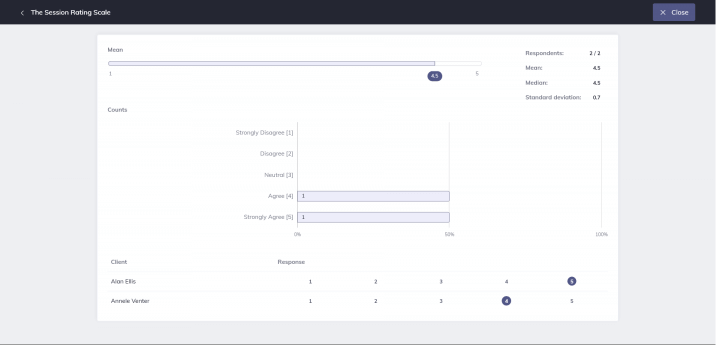
This is a good way to analyze your scores and identify improvements to your solutions, style, or sessions.
Best Practice: Timing Your Feedback Collection
Distribute your feedback form within 24 hours of the workshop while the experience is fresh. Research suggests that delayed feedback collection leads to lower response rates and less detailed, less accurate responses. For multi-day workshops, consider brief end-of-day check-ins alongside a comprehensive final evaluation to capture both immediate reactions and overall impressions.
The Value-First Practitioner (Free Guide)
Discover how 10,000+ practitioners grow their practices through client transformation, not marketing.
Designing Your Virtual Workshop with Quenza
On top of the ability to share forms and gather feedback, Quenza has everything you need to design your virtual workshop from scratch.
Or if you prefer to save time, you can easily modify pre-made activities, exercises, assessments, and forms using templates from Quenza’s Expansion Library.
Depending on the kind of workshop you’re hoping to run, you might find the following step-by-step guides useful:
- How To Create An Online Training Program: Your Ultimate Guide
- How To Create An Online Course With The Quenza Platform
- How To Develop A Training Program For Employees
- A Guide to Online Tutoring: Best Platform and Resources
- Training Others In Emotional Intelligence: Your Ultimate Guide
10 Handy Online Tools in Quenza
The beauty of Quenza is that it is uniquely designed to enhance the way you train, coach, teach, or develop others.
That means it comes fully equipped with a suite of tools that help you promote your coach branding, experiment with new offers, and more.
Here’s what Quenza includes:
- An Activity Builder – for creating customized workshop content like quizzes, exercises, homework, and microlearnings/lecturettes with your own multimedia
- Pathway Tools – that you can use to assemble your content into programs (and schedule it to ‘drip-feed’ materials to your learners)
- Live results tracking – so you can stay on top of progress, performance, and compliance in real-time
- Group coaching tools – with Quenza Groups, you can design your workshop and deliver it to cohorts of up to 50 participants
- Secure, private storage and communications (encrypted with AES-256 in transit and at rest)
- Note-taking and documentation features – for journals, diaries, or your private workshop notes
- File storage and sharing – Quenza Files is an easy way to manage and send documents, spreadsheets, images, videos, PDFs, and more with workshop members
- A white label feature – so you can upload your own or your organization’s logo to all workshop materials
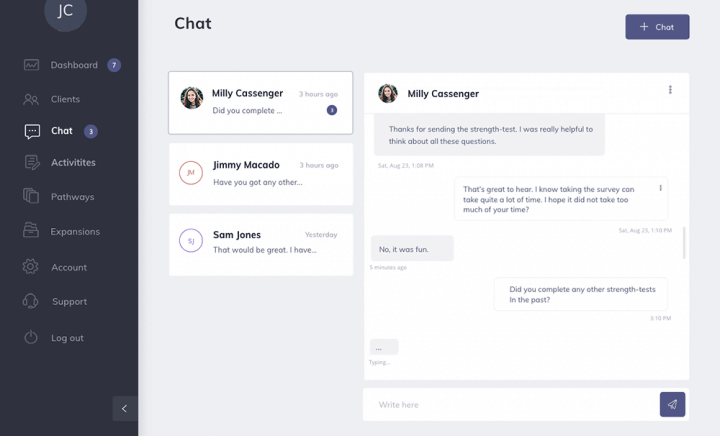
- Live chat – with groups and teams through the Quenza Client App, as pictured above
- An Expansion Library – full of personalizable Activity templates that you can send alone or as part of your workshop programs.
Integrating Feedback into Future Workshop Plans
To ensure that your workshops continually improve and meet the evolving needs of your participants, it’s crucial to integrate the feedback you receive into your future planning.
Start by analyzing the feedback data to identify common themes and specific areas of improvement. For instance, if multiple participants mention that the workshop pace was too fast, consider adjusting your schedule to allow more time for key activities or discussions.
Furthermore, make a habit of discussing feedback with your team or co-facilitators to brainstorm actionable changes. This collaborative approach not only fosters a culture of continuous improvement but also helps in generating innovative solutions to recurring issues.
Additionally, communicating to participants how their feedback has influenced your workshop design can significantly enhance their sense of involvement and satisfaction. This transparency not only builds trust but also encourages more honest and constructive feedback in the future.
By systematically incorporating feedback into your planning process, you can ensure that each workshop is better than the last, ultimately leading to more effective and engaging learning experiences.
“Feedback is not just about measuring satisfaction – it is a critical mechanism for continuous professional development. The most effective practitioners treat every piece of participant feedback as data that informs their next iteration of practice.”
– Dr. Thomas Guskey, Educational Measurement Researcher
Caution: Avoiding Feedback Form Bias
Leading questions, double-barreled items, and acquiescence bias can undermine the validity of your workshop feedback. Avoid questions like “Did you enjoy the excellent content?” which presuppose a positive answer. Instead, use neutral phrasing such as “How would you rate the relevance of the content to your professional needs?” Always pilot-test your form with a colleague before distribution.
Leveraging Technology to Enhance Feedback Collection
In today’s digital age, leveraging technology to collect workshop feedback can streamline the process and yield more insightful data.
Utilizing online survey tools, such as Google Forms, SurveyMonkey, or Quenza’s digital tools, can simplify the creation, distribution, and analysis of feedback forms. These platforms offer various customization options, allowing you to tailor questions to specific aspects of your workshop.
Moreover, they provide advanced analytics features that can help you visualize trends and patterns in participant responses. Implementing real-time feedback mechanisms, like live polls or interactive Q&A sessions during the workshop, can also provide immediate insights and allow for on-the-spot adjustments.
Additionally, consider using mobile apps to gather feedback, as they offer convenience for participants to respond at their own pace. Integrating these technological solutions not only makes the feedback collection process more efficient but also enhances the quality of the feedback you receive.
By adopting these tools, you can gather more comprehensive and actionable insights, leading to continuous improvement and higher satisfaction among your workshop participants.
How Do You Measure Workshop Effectiveness Beyond Feedback Forms?
While feedback forms provide essential participant perspectives, measuring true workshop effectiveness requires a multi-layered approach. Kirkpatrick’s Four Levels of Evaluation framework suggests assessing reaction (satisfaction), learning (knowledge gained), behavior (application on the job), and results (organizational impact).
Practitioners can supplement feedback forms with pre- and post-assessments to measure knowledge gains, follow-up surveys at 30, 60, and 90 days to track behavioral change, and outcome metrics tied to the workshop’s learning objectives. This comprehensive evaluation approach provides a clearer picture of whether your workshop created lasting professional growth.
What Are Common Mistakes When Creating Workshop Feedback Forms?
Several common pitfalls can reduce the usefulness of your workshop feedback data. Asking too many questions leads to survey fatigue and incomplete responses – aim for 8 to 12 targeted questions maximum. Using vague language like “Was the workshop good?” yields vague answers, while overly complex rating systems confuse participants.
Other frequent mistakes include failing to align questions with your workshop objectives, neglecting to include open-ended questions for nuanced feedback, and not testing the form before distribution. Practitioners should also avoid collecting feedback only at the end – mid-workshop pulse checks can reveal issues while there is still time to adjust.
How Can You Increase Workshop Feedback Response Rates?
Low response rates are one of the most common challenges practitioners face with post-workshop evaluation. Research in survey methodology suggests that response rates improve significantly when feedback is framed as a professional contribution rather than a requirement.
Effective strategies include dedicating the last five minutes of your workshop specifically for form completion, keeping forms concise (under five minutes to complete), explaining exactly how the feedback will be used to improve future sessions, and following up within 48 hours with non-respondents. Digital platforms that allow mobile-friendly completion also see higher engagement than desktop-only or paper formats.
Professional Disclaimer: This article is for informational and educational purposes only and is not a substitute for professional training, certification, or supervision. Workshop facilitation practices should be adapted to your specific professional context, ethical guidelines, and the populations you serve. Always follow your profession’s code of ethics and relevant regulatory requirements.
Build Better Feedback Forms with Quenza
Create, distribute, and analyze workshop feedback forms with a platform designed for practitioners. Start your free 30-day trial today.
Final Thoughts
If you’re evaluating your workshops, feedback forms are a great way to collect data and enhance your approach the next time around.
Make sure you’ve got a finger on the metrics that matter, and you’ll probably start to notice that your learners are sticking around for longer.
Ready to design and share your own workshop feedback forms? For a month of unlimited access to all the tools you’ll need, don’t forget to start your free Quenza trial today.
Frequently Asked Questions
What should a workshop feedback form include?
A comprehensive workshop feedback form should include Likert-scale ratings for overall satisfaction, open-ended questions about strengths and areas for improvement, questions about specific learning objectives, logistics and facilitation quality ratings, and a Net Promoter Score question asking whether participants would recommend the workshop.
When is the best time to distribute workshop feedback forms?
The optimal time to distribute feedback forms is immediately after the workshop concludes or within 24 hours. Participants recall details most accurately when the experience is fresh. For multi-day workshops, consider brief daily check-ins combined with a comprehensive final evaluation form.
How many questions should a workshop feedback form have?
Most effective workshop feedback forms contain between 8 and 12 questions. This range provides enough data for meaningful analysis while keeping the form completable in under five minutes. Going beyond 15 questions significantly increases survey fatigue and lowers completion rates.
Can workshop feedback forms be used for virtual workshops?
Yes, digital feedback forms are especially well-suited for virtual workshops. Platforms like Quenza allow you to send automated feedback requests via email or client portals immediately after a session. Virtual feedback forms can include additional questions about technology experience, engagement levels, and the effectiveness of online delivery methods.
How do you analyze workshop feedback effectively?
Effective feedback analysis involves aggregating quantitative ratings to identify trends, coding open-ended responses into themes, comparing results across multiple sessions, and prioritizing actionable changes. Digital platforms can automate much of this analysis, generating visual reports that highlight areas of strength and opportunities for improvement.
What is the difference between formative and summative workshop evaluation?
Formative evaluation occurs during the workshop and is designed to make real-time adjustments to content or delivery. Summative evaluation takes place after the workshop and assesses overall effectiveness against stated objectives. A comprehensive feedback strategy uses both types to maximize learning outcomes and continuously improve program quality.
References
1. Kirkpatrick, D. L., & Kirkpatrick, J. D. (2006). Evaluating Training Programs: The Four Levels. Berrett-Koehler Publishers. Publisher Link
2. Guskey, T. R. (2000). Evaluating Professional Development. Corwin Press. https://doi.org/10.4135/9781452230597
3. Phillips, J. J. (2003). Return on investment in training and performance improvement programs. Performance Improvement, 42(1), 8-12. https://doi.org/10.1002/pfi.4930420104
4. Sitzmann, T., et al. (2008). A review and meta-analysis of the nomological network of trainee reactions. Journal of Applied Psychology, 93(2), 280-295. https://doi.org/10.1037/0021-9010.93.2.280
5. Colquitt, J. A., LePine, J. A., & Noe, R. A. (2000). Toward an integrative theory of training motivation. Journal of Applied Psychology, 85(5), 678-707. https://doi.org/10.1037/0021-9010.85.5.678
6. Knowles, M. S., Holton, E. F., & Swanson, R. A. (2014). The Adult Learner (8th ed.). Routledge. https://doi.org/10.4324/9781315816951
7. Dillman, D. A., Smyth, J. D., & Christian, L. M. (2014). Internet, Phone, Mail, and Mixed-Mode Surveys: The Tailored Design Method (4th ed.). Wiley. https://doi.org/10.1002/9781394260645
8. Salas, E., et al. (2012). The science of training and development in organizations. Psychological Science in the Public Interest, 13(2), 74-101. https://doi.org/10.1177/1529100612436661
9. Aguinis, H., & Kraiger, K. (2009). Benefits of training and development for individuals and teams, organizations, and society. Annual Review of Psychology, 60, 451-474. https://doi.org/10.1146/annurev.psych.60.110707.163505
10. Fowler, F. J. (2013). Survey Research Methods (5th ed.). SAGE Publications. https://doi.org/10.4135/9781452230184
To the quenza.com admin, Your posts are always informative and well-explained.