
Plans and billing
Cancel subscription
Stop your Quenza subscription from renewing, see how long you keep access, and learn what happens to your workspace and data.
You can cancel your Quenza subscription at any time. There is no cancellation fee and no long-term contract. Cancelling stops the renewal; you keep using Quenza until the end of the period you have already paid for. The workspace Owner, Manager and Billing Manager can cancel, in the web app.
Cancel
Section titled “Cancel”Go to Billing → Subscription under Administration in the sidebar. The Cancel Subscription card sits next to Billing Address and Payment Method at the top of the page.

- In the Cancel Subscription card, click Cancel Subscription.
- Check the date until which your access stays active.
- Type your workspace name to confirm.
- Click Cancel Subscription.
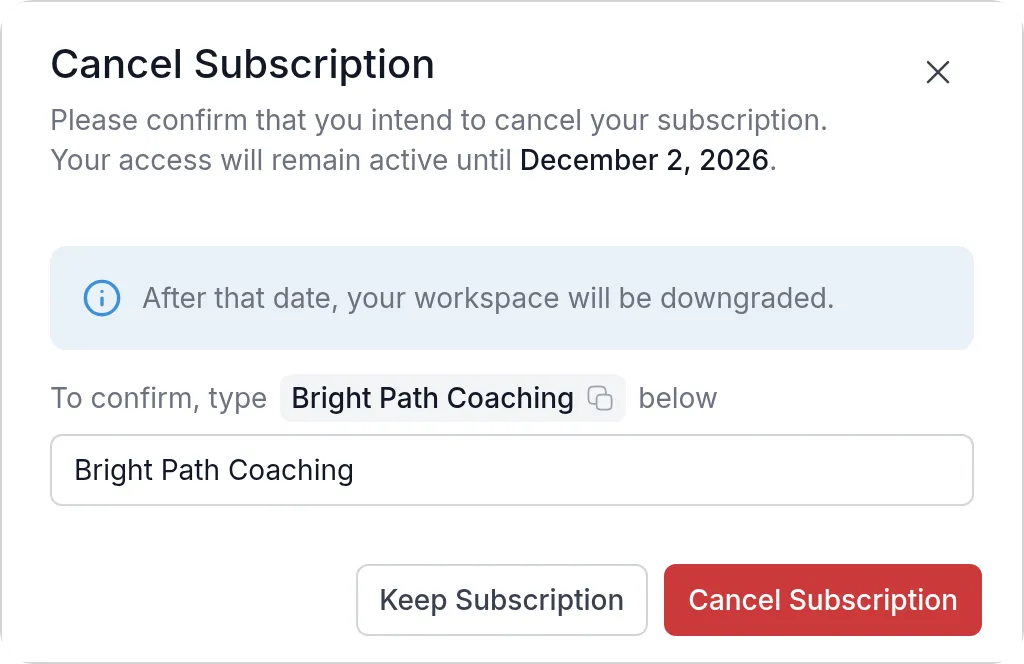
Changed your mind in the dialog? Click Keep Subscription. If you had a scheduled downgrade, cancelling removes it.
Until the end date
Section titled “Until the end date”Nothing changes for you or your clients until the end date. You won’t be charged again. The card now shows Subscription Cancelled with the date your subscription ends.
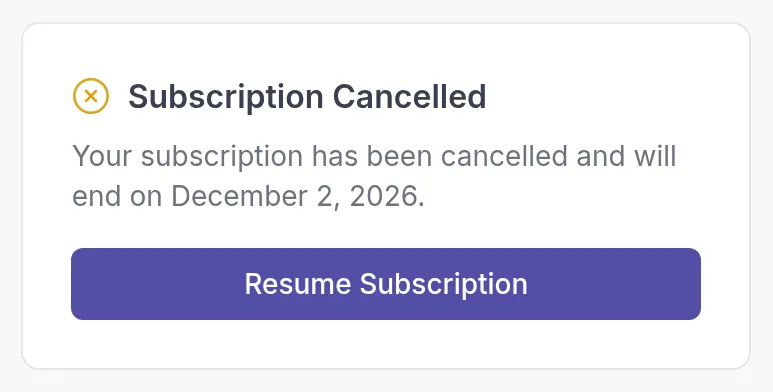
To continue after all, click Resume Subscription before that date. Your subscription renews as before, on the same plan.
After the end date
Section titled “After the end date”Your workspace becomes inactive. The Owner, Manager and Billing Manager see a Subscription Ended page where they can choose a plan; other professionals see a message to contact them.
Cancelling doesn’t delete anything. Your clients, activities, programs and other content are kept, so you can subscribe again and continue where you left off. To remove your workspace and all its data permanently, see Delete workspace or account.
Need help?
Section titled “Need help?”If you are thinking about cancelling because something doesn’t work the way you expected, contact our support team first. We are happy to help you find a solution or a better-fitting plan.
Was this article helpful?
Thanks for letting us know.
Thank you. We read every answer and use it to improve this article.