
Plans and billing
Legacy plans
What your Legacy plan includes, how it compares with the new Spark to Beyond plans, and what to check before you switch.
If you signed up before Quenza introduced its current plans, you are on the Legacy plan. Nothing about your plan has changed: you keep the same price and features. The Billing page shows a You’re on a Legacy Plan banner so you know which plan you are on.
You don’t need to do anything. One thing to know: new features are added to the new plans only, not to the Legacy plan.
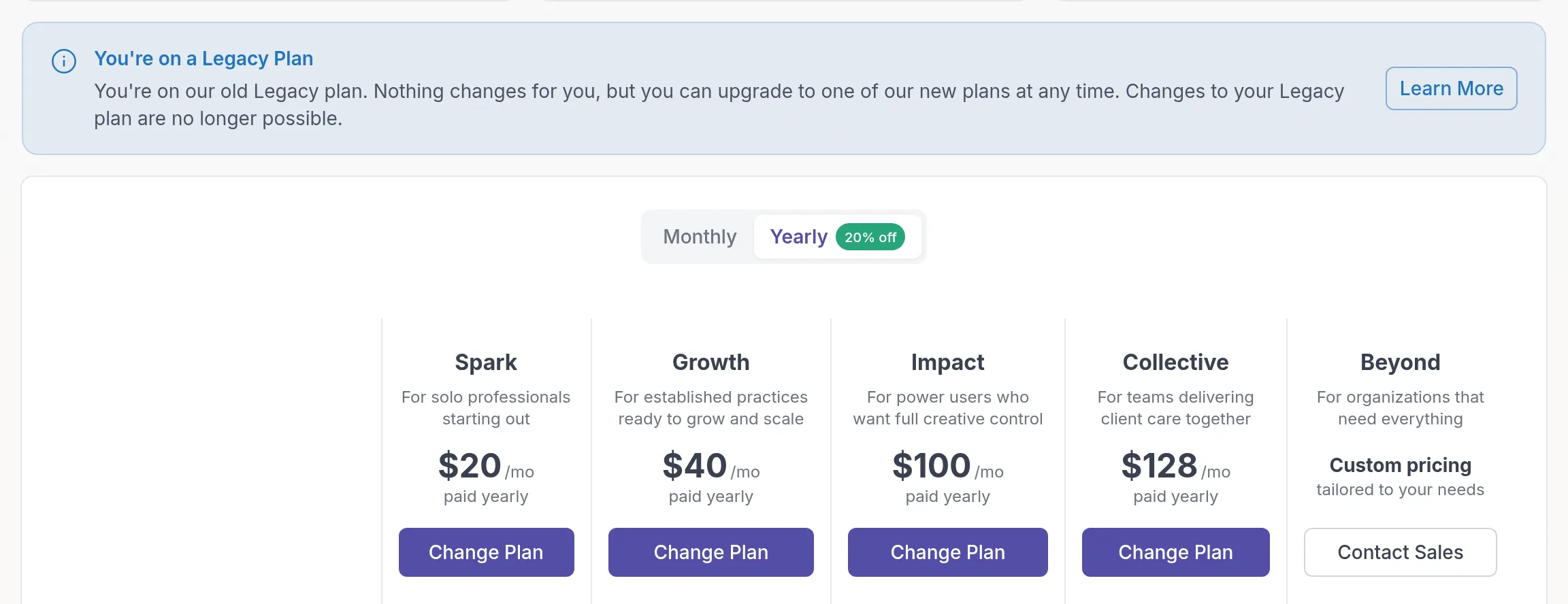
What your Legacy plan includes
Section titled “What your Legacy plan includes”Clients and team
- 5 active clients included. Client blocks you already purchased stay on your plan, but you can no longer buy new client blocks.
- Unlimited archived clientsArchived clientA client you no longer work with, moved out of your active client list. Their history stays, and you can unarchive them at any time. with read-only access. On the Legacy plan, archived clients don’t count toward your limit.
- 1 practitioner included, with the option to add more team members.
Features
- Client portalClient portalThe website where your clients sign in to see their activities, programs, tasks, files and chats. The Quenza app shows the same., plus the mobile apps for you and your clients
- Unlimited storage
- RolesRolesWhat each person in your workspace can see and do: Owner, Manager, Member or Billing Manager. and permissions for your team
- Activities, programs and tasks
- ResourcesResourcesYour workspace's library of files and links, such as worksheets, handouts and audio exercises, which you link to clients and groups. (file and material sharing)
- Groups
- 1:1 chat, group chat and team chat
- Multi-language support
- Core, Plus and Premium content libraries
- Custom logo and custom sender branding
- Custom domains (your client portal on your own web address)
- Calendly and Google Calendar integrations
- Webhooks and API access
- Pre-made content and email support
Not included
These features were released after the Legacy plan was set, so they are only available on the new plans:
- Recurring tasks
- Landing pages
- Email templates
- Custom translations, such as renaming “My professional” in your clients’ app
The new plans
Section titled “The new plans”Each new plan includes everything in the plan below it, plus more.
| Plan | Price (billed monthly) | Clients | Practitioners | Built for |
|---|---|---|---|---|
| Spark | $25/mo | 10 | 1 | Solo practitioners starting out |
| Growth | $50/mo | 250 | 1 | Established practices ready to scale |
| Impact | $125/mo | 400 | 1 | Power users who want full creative control |
| Collective | $160/mo | 500 | 3 | Teams delivering care together |
| Beyond | Custom | Unlimited | Unlimited | Larger organizations |
Billing yearly saves 20% on every plan. On the new plans, archived clients count toward the client limit. See Client limits and Plans and pricing.
Why you might switch
Section titled “Why you might switch”- New features. Your Legacy plan stays as it is, which also means it doesn’t get new features. Everything we release from now on goes to the new plans.
- More clients. You can no longer add client blocks to the Legacy plan. The new plans include far more clients: 250 on Growth, 400 on Impact, 500 on Collective and unlimited on Beyond.
Check which plan covers what you use
Section titled “Check which plan covers what you use”Because the Legacy plan includes almost every feature, check which new plan covers the features you rely on:
- On every plan, from Spark: Resources and multi-language
- From Growth: Groups, group chat, Plus content, custom logo, Calendly, Google Calendar and webhooks (1 endpoint on Growth, 2 on Impact, 5 on Collective)
- From Impact: Premium content, custom sender and custom domains
- From Collective: team chat and API access
- Beyond only: unlimited clients and professionals, roles and permissions
If you move to a plan without a feature you use now, Quenza tells you what will change before you confirm. See Change plan.
If you stay
Section titled “If you stay”Staying on the Legacy plan is fine. You keep your price and features for as long as you stay on it. You won’t get features released from now on, and you can’t buy additional client blocks.
Switch to a new plan
Section titled “Switch to a new plan”For example: a coach on the Legacy plan with 40 clients who also runs a Mindfulness group needs groups, so Growth (250 clients) covers what she uses. Her Legacy client blocks no longer matter, because Growth includes the clients.
- In the sidebar under Administration, click Billing → Subscription.
- Choose Monthly or Yearly.
- Click Change Plan on the plan you want.
The switch to a new plan takes effect immediately. If the new plan has fewer features than you use now, Quenza lists what will change before you confirm. You can’t go back to the Legacy plan afterwards.
If you would like help choosing, contact our support team.
Was this article helpful?
Thanks for letting us know.
Thank you. We read every answer and use it to improve this article.