
Plans and billing
Monthly or yearly billing
Switch your Quenza plan between monthly and yearly billing at any time, and see how paying yearly saves 20% compared to paying monthly.
Every plan can be paid monthly or yearly. Paying yearly costs 20% less than paying monthly. You can switch at any time without changing your plan or its features. The workspace Owner, Manager and Billing Manager can do this, in the web app.
Monthly or yearly: which suits you
Section titled “Monthly or yearly: which suits you”| Plan | Monthly billing | Yearly billing | You save per year |
|---|---|---|---|
| Spark | $25 a month, $300 a year | $240 a year ($20 a month) | $60 |
| Growth | $50 a month, $600 a year | $480 a year ($40 a month) | $120 |
| Impact | $125 a month, $1,500 a year | $1,200 a year ($100 a month) | $300 |
| Collective | $160 a month, $1,920 a year | $1,536 a year ($128 a month) | $384 |
Monthly suits you while you are still finding out which plan fits, or when your practice is changing, for example while you build up your client base after the free trial. You pay a smaller amount each month and can change course easily.
Yearly suits you once your practice is settled. Sarah Bennett has run Bright Path Coaching on Growth for six months and knows it fits. Switching to yearly costs her $480 a year instead of $600.
Switch
Section titled “Switch”Go to Billing → Subscription under Administration in the sidebar. Above the plans, select Yearly or Monthly: the prices change to that interval, and your current plan shows a Switch button. Click Switch to move to the other interval.
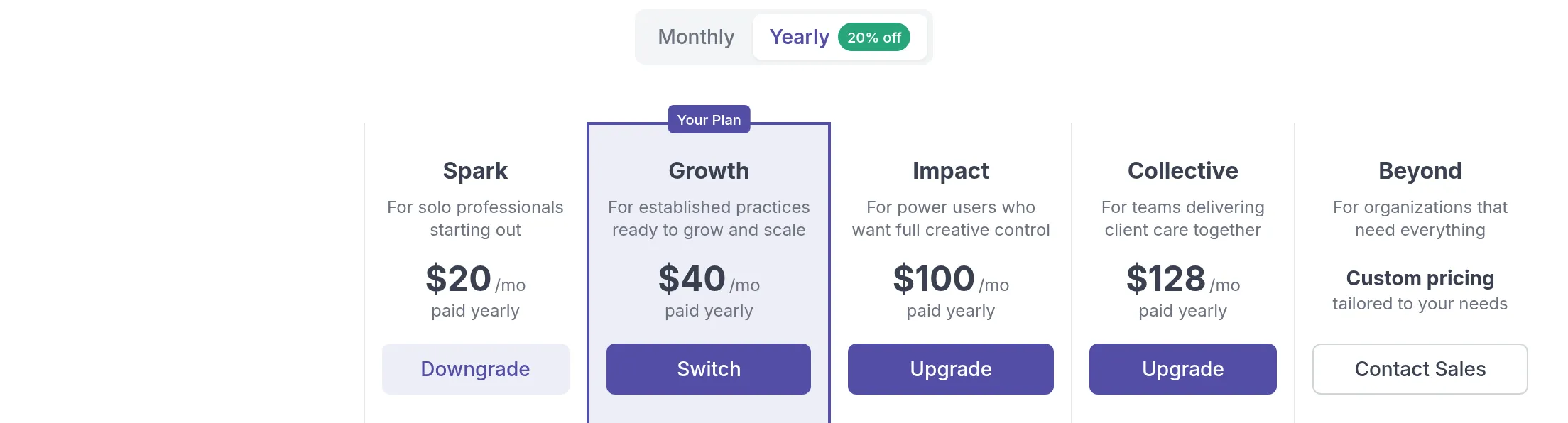
The switch takes effect right away:
- From monthly to yearly: your yearly term starts now and you are charged the yearly price. The part of the current month you have already paid for is taken into account.
- From yearly to monthly: your monthly billing starts now. The part of your yearly payment you haven’t used yet is taken into account.
The new amount appears on your next invoice under Billing → Invoices. See Invoices and taxes.
What doesn’t change
Section titled “What doesn’t change”Switching how often you pay doesn’t change your plan, your client limit or your features. To move to another plan, such as from Spark to Growth, see Change plan. You can switch interval and plan in one go: select Yearly, then click Upgrade on the higher plan.
Was this article helpful?
Thanks for letting us know.
Thank you. We read every answer and use it to improve this article.