
Plans and billing
Invoices and taxes
Find and download your Quenza invoices as PDF, pay an open invoice, and learn how subscription payments and VAT work.
Every payment for your Quenza subscription comes with an invoice. You need them for your bookkeeping, for example to send to your accountant at the end of the quarter. The workspace Owner, Manager and Billing Manager can view them, in the web app.
View and download invoices
Section titled “View and download invoices”In the sidebar under Administration, click Billing → Invoices. The page lists your 10 most recent invoices, newest first, with the Invoice number, Date, Status and Amount.
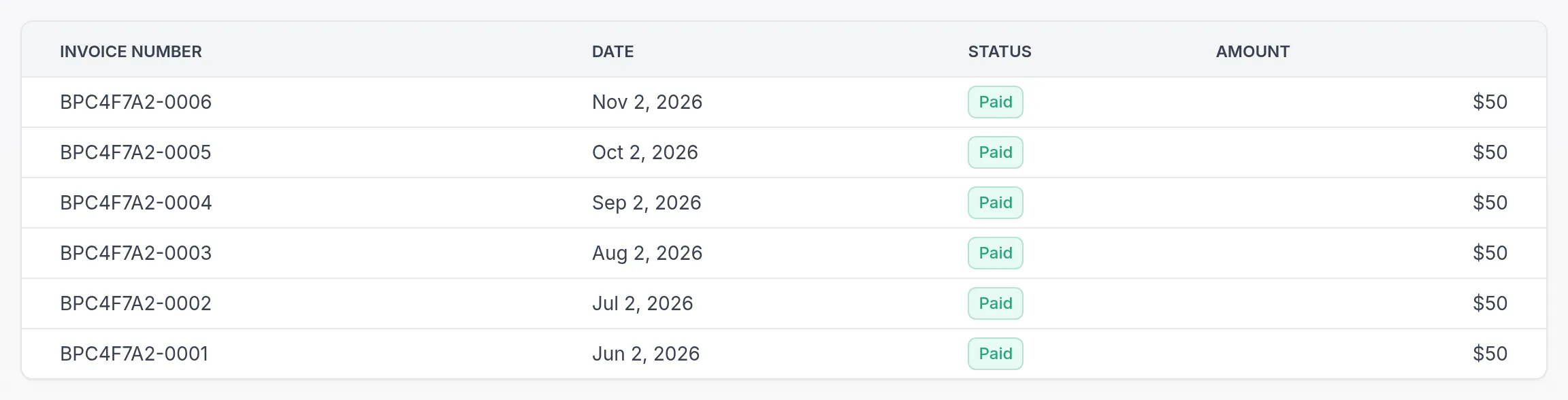
Click an invoice to open it on a secure page of our payment provider, in a new tab. There you can see the full invoice and download it, or its receipt, as a PDF.
Invoice status
Section titled “Invoice status”- Paid: the payment went through.
- Open: not paid yet. Click the invoice to pay it.
- Overdue: the payment date has passed. Click the invoice to pay it, and check your payment method.
- Uncollectible or Void: the invoice no longer needs to be paid.
How payments are taken
Section titled “How payments are taken”Subscriptions are paid by card through our secure payment provider. Your plan renews automatically at the end of each billing period, monthly or yearly, until you cancel.
When you change your plan or billing interval during a period, the difference for the rest of that period is settled on your invoice. See Change plan and Monthly or yearly billing.
The prices on our pricing page include VAT. The price you see is the price you pay; VAT is not added on top at checkout. Tax is calculated from your billing address, so keep it up to date to get the correct tax details on your invoice.
No hidden fees
Section titled “No hidden fees”You pay your plan’s monthly or yearly price. There are no setup fees and no extra per-client charges on top of your plan.
Questions about a charge
Section titled “Questions about a charge”If a charge or invoice looks unexpected, contact our support team and mention the invoice number.
Was this article helpful?
Thanks for letting us know.
Thank you. We read every answer and use it to improve this article.