
Plans and billing
Plans and pricing
See what each Quenza plan costs, how many clients and professionals it includes, and which features it adds.
Quenza has five plans, so you can start with what you need and move up as your practice grows. Every workspace starts with a 30-day free trial, no credit card required.
Plans at a glance
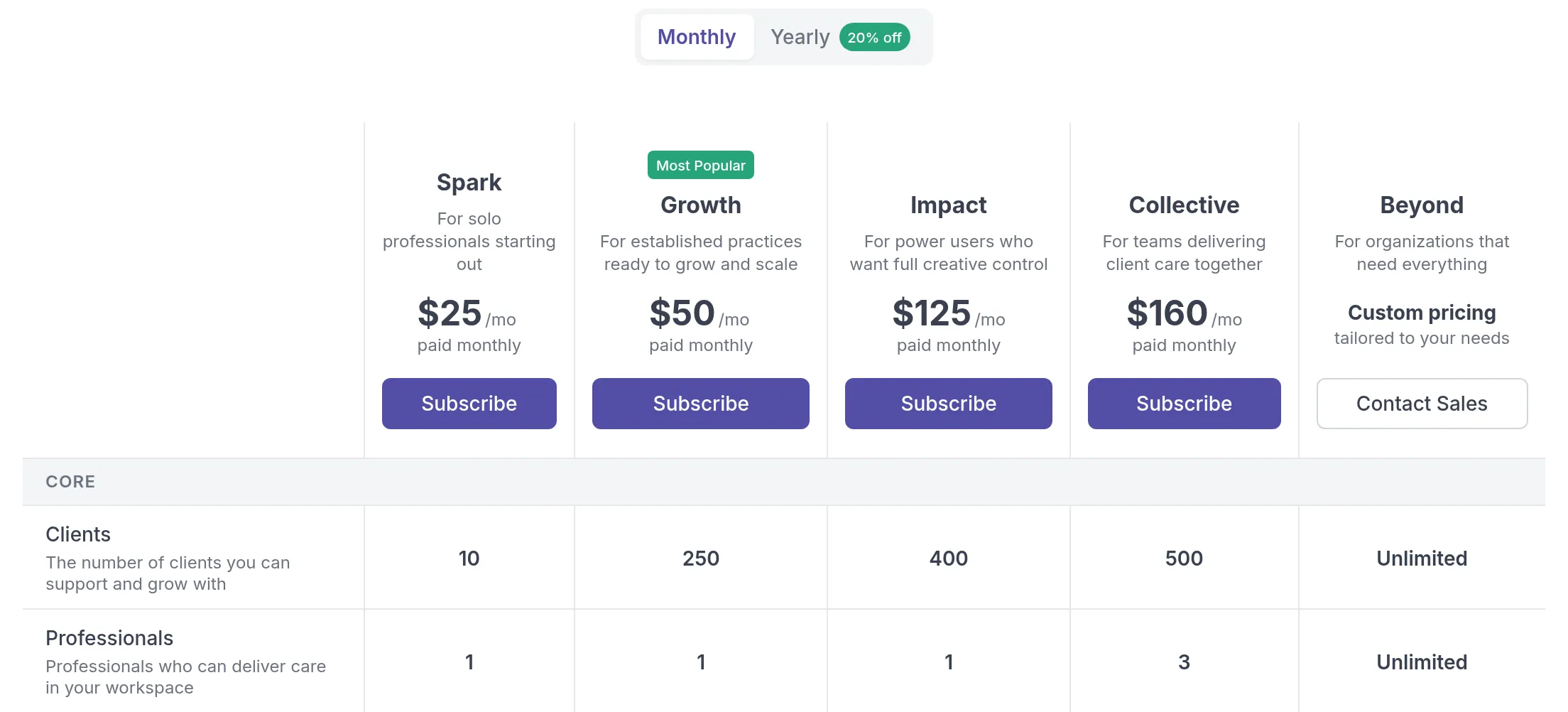
Section titled “Plans at a glance”| Plan | Monthly | Yearly (per month) | Clients | Professionals | Best for |
|---|---|---|---|---|---|
| Spark | $25 | $20 | 10 | 1 | Solo professionals starting out |
| Growth | $50 | $40 | 250 | 1 | Established practices ready to scale |
| Impact | $125 | $100 | 400 | 1 | Power users who want full creative control |
| Collective | $160 | $128 | 500 | 3 | Teams delivering client care together |
| Beyond | Custom | Custom | Unlimited | Unlimited | Organizations operating at scale |
Paying yearly saves you 20% compared to paying monthly. See Monthly or yearly billing. Each plan includes everything in the plan below it, plus its own additions. In this help center, an article about a feature that needs a higher plan shows it under the title, for example Growth plan and higher. Articles without such a note describe features every plan has.
The client limit counts archived and invited clients too. See Client limits and Professional seats.
What each plan includes
Section titled “What each plan includes”The core for a solo practice: activities, programs, notes, tasks, Resources for sharing files and materials, the client portalClient portalThe website where your clients sign in to see their activities, programs, tasks, files and chats. The Quenza app shows the same., the mobile apps for you and your clients, 1:1 client chat, multi-language support, custom translations and the Core content library. Unlimited storage is included on every plan.
Growth
Section titled “Growth”Everything in Spark, plus the Plus content library, Groups, group chat, recurring tasks, email templates, 1 landing page, custom logo branding, Calendly and Google Calendar, 1 webhook endpoint and email support. Growth is the most popular plan.
Impact
Section titled “Impact”Everything in Growth, plus the Premium content library, a custom sender email address, a custom domain for your client portal, up to 3 landing pagesLanding pageA public web page about your practice with a signup form. Visitors who sign up arrive in your workspace as clients. and up to 2 webhook endpoints.
Collective
Section titled “Collective”Everything in Impact, with up to 3 professionals. It adds team chat, API access, up to 5 landing pages and up to 5 webhookWebhookA message Quenza sends to another app as soon as something happens, such as a new client, so that app can act on it. endpoints.
Beyond
Section titled “Beyond”Everything in Collective, with unlimited clients, professionals, landing pages and webhooks. It adds roles and permissions, premium support, full service setup and content built for your practice. Beyond is priced per organization: click Contact Sales on the Billing page, tell us about your team, and we send you a quote.
See the full comparison
Section titled “See the full comparison”The Billing page shows every plan side by side, with a feature-by-feature comparison below the prices. Go to Billing → Subscription under Administration in the sidebar, use the Monthly and Yearly toggle to see both prices, and scroll down for the features. Billing is available to the workspace Owner, Manager and Billing Manager, in the web app only.
Choose a plan
Section titled “Choose a plan”Start with two questions: how many clients do you have, counting archived and invited clients, and how many professionals work in your workspace? Then check which features you need.
- A coach starting out with a handful of one-to-one clients fits on Spark.
- A therapist with a full caseload who also runs a Mindfulness group needs Growth: groups, group chatGroup chatOne shared conversation for the members of a group and their professionals. You turn it on per group. and room for 250 clients.
- A practitioner who wants clients to see only their own brand, with their own email sender and portal address, picks Impact.
- A practice like Bright Path Coaching, where Sarah Bennett works with two colleagues, needs Collective for its 3 professional seats.
If you are unsure, start lower. You can move up at any time, and upgrades take effect immediately. See Change plan.
Was this article helpful?
Thanks for letting us know.
Thank you. We read every answer and use it to improve this article.