
Manage clients
Restore clients
Unarchive a client so you can work with them again, with their history, notes and messages back in your active client list.
When an archived clientArchived clientA client you no longer work with, moved out of your active client list. Their history stays, and you can unarchive them at any time. comes back, unarchive them. They return to your active clients with all of their history, notes and messages, so you can pick up where you left off.
For example, Henrik Larsen finished coaching with Sarah Bennett last spring and books a new trajectory in the autumn. Sarah unarchives him, rereads her notes and his completed activities, and sends him a fresh intake questionnaire.
Find your archived clients
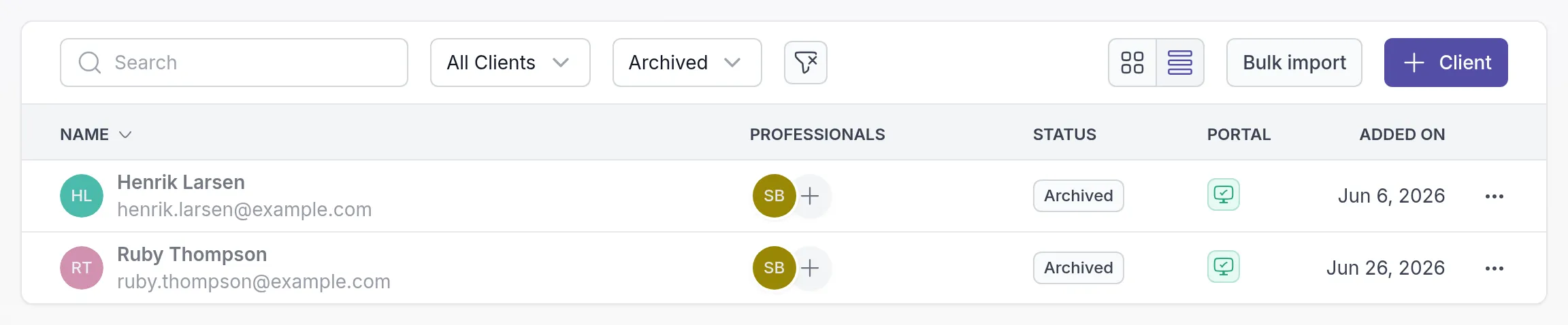
Section titled “Find your archived clients”Go to Clients, open the All statuses filter and choose Archived. Archived clients have the status Archived.
Unarchive a client
Section titled “Unarchive a client”Click ⋯ at the end of the archived client’s row and choose Unarchive. The same option is in the ⋯ menu at the top right of the client’s page.

Confirm with Unarchive client.

If you have reached your plan’s client limit, Quenza asks you to upgrade before it restores the client. See Client limits.
After you restore a client
Section titled “After you restore a client”- The client is active again and can use the client app as before.
- You can send activities and programs, share notes, assign tasks, and pick the client as the context of a note or task.
Activities and programs that were canceled when you archived the client are not restarted. Send them again if the client still needs them.
Restored a client by mistake? Archive them again.
Was this article helpful?
Thanks for letting us know.
Thank you. We read every answer and use it to improve this article.