
Recurring Tasks, a Cleaner Task List, and Fully Branded Emails
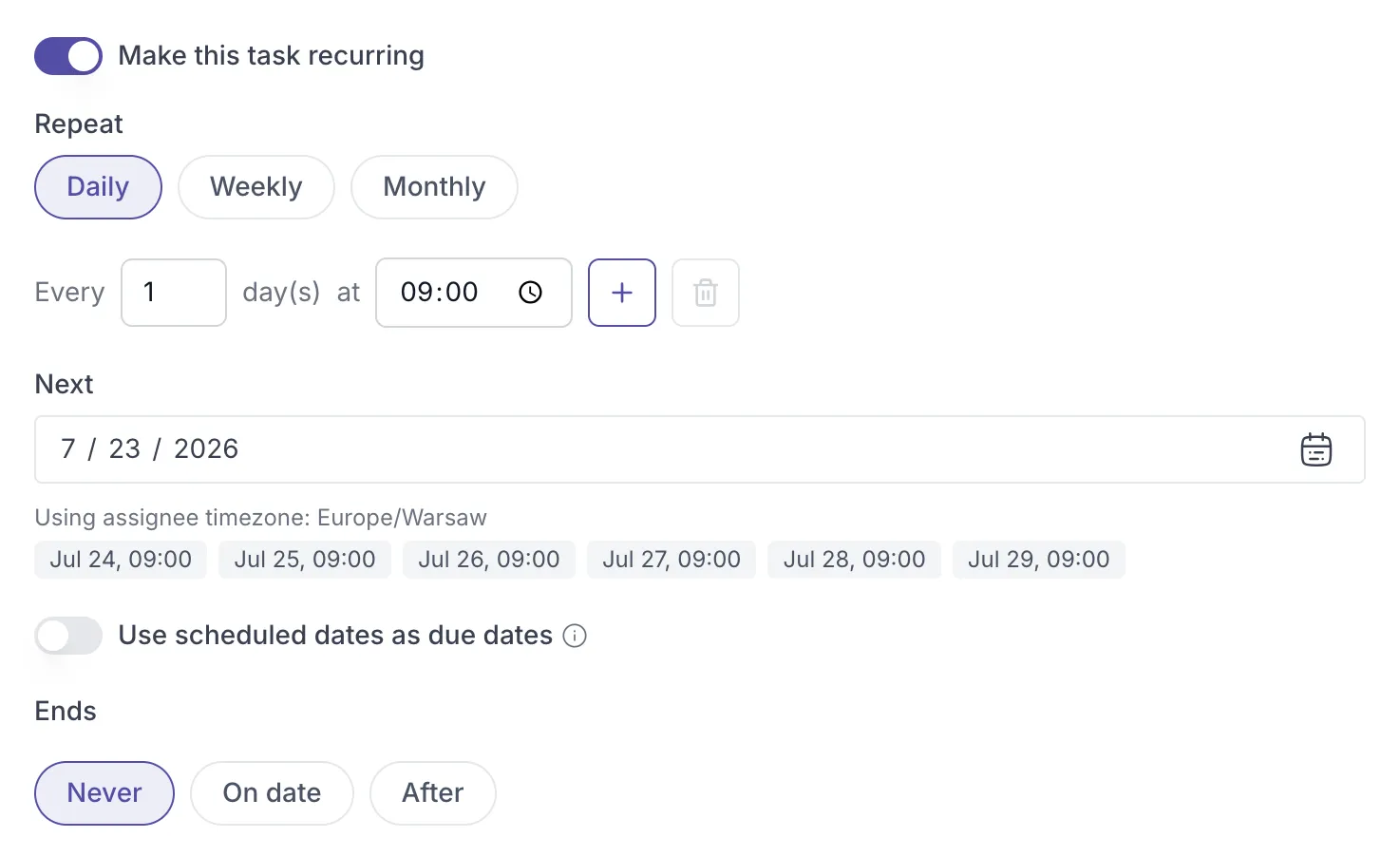
Create a task once and have it repeat automatically, so you never have to recreate the same to-do every day, week, or month. Recurring tasks work for your own workflow or for anything you assign to a client, like a daily breathing exercise or a weekly reflection.
Set a schedule that fits
Section titled “Set a schedule that fits”When you create a task, turn on “Make this task recurring” to open the scheduling options. Choose Daily, Weekly, or Monthly, and shape it however you need: repeat every few days, pick specific days of the week, or land on the same date each month. You can even add more than one time per day, so a task like a three-times-daily medication reminder shows up in the morning, midday, and afternoon.
Control when it starts and stops
Section titled “Control when it starts and stops”Set when the first occurrence happens, and preview the upcoming dates before you save so the schedule looks right. Then decide how it ends: keep it going indefinitely, stop on a specific date, or stop after a set number of occurrences, for example a six-week program that ends after six reflections.
Deadlines that work your way
Section titled “Deadlines that work your way”Every occurrence appears on its scheduled date. With the “Use scheduled dates as due dates” toggle, you decide whether that date is also a deadline. Turn it on and each occurrence is due the day it appears and marked overdue if missed. Turn it off and the task still appears, with no deadline attached.
Built for clients across time zones
Section titled “Built for clients across time zones”If you assign a recurring task to a client in a different time zone, the schedule follows the client’s time zone, not yours, so they receive it at the right local time. A note under the schedule shows which time zone is in use, and the preview reflects it, so it is always worth a quick check after assigning a client.
You can edit any recurring task later from the three-dot menu to adjust the pattern, times, start date, or end conditions. See the full guide at the help article.
✨ Also new
Section titled “✨ Also new”- Completed tasks, out of your way - Your task list now separates completed tasks into their own “Completed” tab, so your active to-dos stay front and center.
- Reminders for individual activities in a program - You can now set a reminder for activities when sending a program, or trigger one on demand from a client’s program activity list, instead of only reminding for single activities.
- Branded system emails with a custom domain - If you’re using a custom domain, system emails like magic login links and password resets are now automatically branded with your custom logo instead of Quenza’s, no setup required.